Tag: Instructional Design

  • Designing eLearning Experiences

    What is your personal perspective on the best manner of designing instruction for online teaching and learning? What is your process? Does it match any existing methods? If so, which? How did you learn to design instruction? Does your process for designing instruction match your larger theoretical perspective? Where is it the same? Where does it diverge?

    Dewey (1904) stressed that teaching requires a technique,requiring training in psychological insight, theory, and experience. The idea mentioned above still  holds true today in both virtual and face to face instructional environments. Papert (1993) suggests that new technologies enhances learning with students actively participating as creators of personal media, supporting diverse intellectual thoughts and styles. As a contributor and student advocate towards a revolution within eLearning and maker movement, I emphasize the topic of voice within instructional design. How is voice utilized within instructional environments? Too often, instructional voice is a passive or copied MOOC or eLearning response. In fact, often eLearning professionals lack instructional voice and ignore the need of learners to receive valuable feedback within the community. Likewise, universities eLearning attempt to copy courses and include faculty whom are often unwilling to embrace the online movement. As a student, I have participated and paid for a poor online course. The teacher failed at communication and course work was copied within the blackboard environment. As a participant, I felt lost and alone. In fact, I could of recieved the same quality of instruction watching YouTube videos.  Within this attempt, faculty fail students as teachers and provide little to no communication.   Facilitation is needed within both face to face and eLearning environments.

    Teaching, in both face to face or virtually, is an art. Teachers must tailor course objectives and instruction, building an engaging and meaningful community. Anderson (2004) provides an excellent description of the role of a teacher within an online community.  Effective eLearning environments must include three critical pieces:  cognitive presence, social presence, and teaching presence.

    It is important to understand that learning to design online instruction requires participating within online environments as an instructor, designer, and student. Doing so provides perspective and produces a quality eLearning teacher, or artist. Failing to participate fully as an online student, teacher, and designer reduces skills sets mentioned above which produces a poor eLearning contributor and creator.  Active learning requires active participation.

    The process of instructional design within such environments is challenging as a designer as creation components require instructors to select technologies that embrace a wide variety of accessibility features. Learning artifacts, authentic reflection pieces, and feedback mechanisms should provide users with a choice of mediums. It is important for the learner to apply content to their real world situation, capture a learning artifact, and share reflections with a wider or global audience using media technologies. The instructor must facilitate this process and a copied course approach does not facilitate such an approach. The above process requires a strong life-long commitment by faculty to be a learner and will require institutions to provide instructional technology training to a faculty population who often fail to embrace change via eLearning platforms.  Perhaps, the time has come for many organizations to recognize that old approaches, although still valid, must be altered to embrace a deeper eLearning experience that students richly deserve.


    Anderson, T. (2004). Teaching in an online learning context. Theory and practice of online learning, 273.

    Dewey, J. (1904). THE RELATION OF THEORY TO PRACTICE IN EDUCATION» 1».

    Papert, S. (1993). The children’s machine: Rethinking school in the age of the computer. Basic Books.
  • Digital Fabrication (DigiFab) Technology as an Instructional Tool in K-12 Professional Development

    A course was designed for current K-12 teachers and instructional technologists recently as part of our PhD research towards our personal learning theory. With modification, this course could easily translate to instruction for pre-service teachers.

    The purpose of the course was to provide professional development (PD) training regarding DigiFab technology and potential instructional uses for quick and efficient implementation.

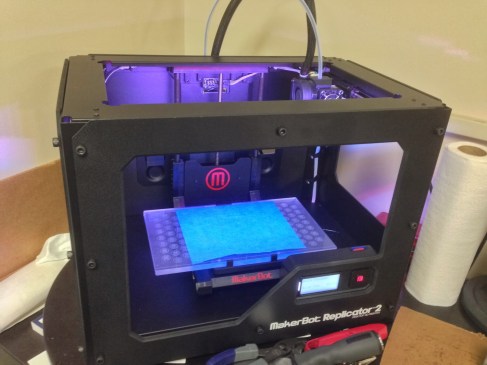
    The following problem was explained by my partner Jared Vanscoder and I. A resurgence of the constructivist approaches to teaching and learning has created a demand for a solution that requires little knowledge of manufacturing processes, aids visualization through tangible representation, and speeds prototyping. Digital fabrication technologies, such as 3D printing, are garnering much attention as they afford users to simply create tangible artifacts from digital model files. This capability is enticing as an tool for teaching and learning in K-12. Given the newness of this technology, very few K-12 instructors (or even instructional technologists) are aware of how these technologies can increase engagement and instructional impact on learners.

    The format of our course is designed as stand-alone instruction to be delivered in two separate formats: face to face (F2F) and online. The option of hybrid (components being delivered both F2F and online) should also be considered.

    How hard is it to develop a research method that both matches your theory and created curriculum?

    The activity allows learners to create order or reorganize information to construct new meaning. Learners construct knowledge, as a builder would begin building a structure. Fabrication technologies facilitate concepts of abstraction, allowing the learner to build or fabricate an actual object or model. It was not hard to match my personallearning theory to fabrication curriculum. After all, fabrication does lend itself to modeling and objects created with such a technology provide for a more meaningful approach to learning. Allowing participants to choose a “real world” scenario or object to reconstruct also fosters an active learning event, which provides further depth and richness in cognitive presence.

    What was simple and what was difficult?

    Creating an online instructional PD approach via problem based learning instructional design model within an e-learning context proved to be challenging. However, Jared and I are committed to being pioneers in the field of Learning Technologies and Cognitive Systems met challenges head on and worked to overcome. The overall product is very strong, with instructional goals met. However, time spent to accomplish learning goals online proves to be more intensive then a face-to-face environment. The overall learning potential I feel is greater in an online e-learning format as it forces the learner to seek solutions and not rely as heavily on an actual face to face community of learners. We suggested a reflection piece of the assessment component. Motivating teachers to complete a reflection at the end of the assessment piece may prove to be challenging. In addition, not seeing a 3D printer and only sending an STL file to post in a blog or learning management system may not be as effective as actually having access to a 3D printed product. Equitable access may prove to be a limitation within the online learning environment for fabrication PD approaches. I feel this activity challenged both Jared and I to think outside the box. As two educators and online students, we understand difficulties presented within the e-learning environment. However, the benefits of the e-Learning activity far outweigh disadvantages. Teachers are exposed to the very learning theory and instructional design methods proven to provide a rich learning experience using learning technologies that foster abstract thinking or cognitive development. Overall, I am very proud of our product. Hopefully, we can test our approach in a qualitative case study.Image

  • Building Online Learning Communities: Synchronous vs. Asynchronous Tools

    Synchronous (i.e. Connect) vs. asynchronous tools (Forums): Which is better at fostering online learning? Why? What are your reasons and evidence for this?

    Stodel, Thompson, & McDonald (2006) stress the importance of maintaining and modeling a “social and cognitive presence” within the online learning community. Results from research cited in the above study indicated that learners engaged in interactive activities focusing on synchronous activities set the stage for a deeper learning experience. Linear asynchronous activities lessened the desire of participants to engage in learning activities. Face to face video using Skype, Google Plus, Adobe Connect, or GoToMeeting activities provide an opportunity in which the learning communities can foster a deeper collaboration experience, building a highly social and interactive exchange of energy. Questioning, reflection, and activities to encourage dialogue deepen the learning experience when utilizing a synchronous approach. Instructors should rely less on the lecture format when using a synchronous tool.  Again, it is important to foster interaction and social dialogue, which is easily accomplished using synchronous technologies.

    Is there a place for asynchronous activities? The above study also found that a creative text dialogue used within the introduction discussion board using a poem improved the social experience within the learning community. It is important to note that advantages do exist using asynchronous tools to include flexibility and improved written communication techniques. Perhaps, asynchronous actives could embrace text based social media tools to improve the overall learning experience. Professional learning discussions are often highly engaging using social media collaboration tools such as Twitter and Today’s Meet. Searls (2012) encourages online learners to reach out using asynchronous tools along with social media can lessen the feeling of isolation.  Often instructors are absent from discussion tools, which leads to an isolated learning experience.

    A blended approach to online learning using a balanced mixture of synchronous and asynchronous tools is the best option to building a rich and interactive learning environment. Instructors must be present and model social engagement consistently and frequently synchronously and asynchronously. Including an organized schedule of expectations and timeline of synchronous and asynchronous tools provides structure to improve the overall effectiveness of a learning exchange.

    Searls, D. B. (2012). Ten simple rules for online learning. PLoS Computational Biology8(9), e1002631.

    Stodel, E. J., Thompson, T. L., & MacDonald, C. J. (2006). Learners’ perspectives on what is missing from online learning: Interpretations through the community of inquiry framework. The International Review of Research in Open and Distance Learning, 7(3).

    Wang, F., & Hannafin, M. J. (2005). Design-based research and technology-enhanced learning environments. Educational Technology Research and Development53(4), 5-23.

    http://academictech.doit.wisc.edu/blend/facilitate/communicate

  • Exploring ARCS and VoiceThread to Improve Online Learning Environments

    Write a reflection about the advanced instructional design model that your group chose for the project. Why did you choose it? How do you think you will approach it? How did you divide up the work among members of the group? What will be your timeline for completion?

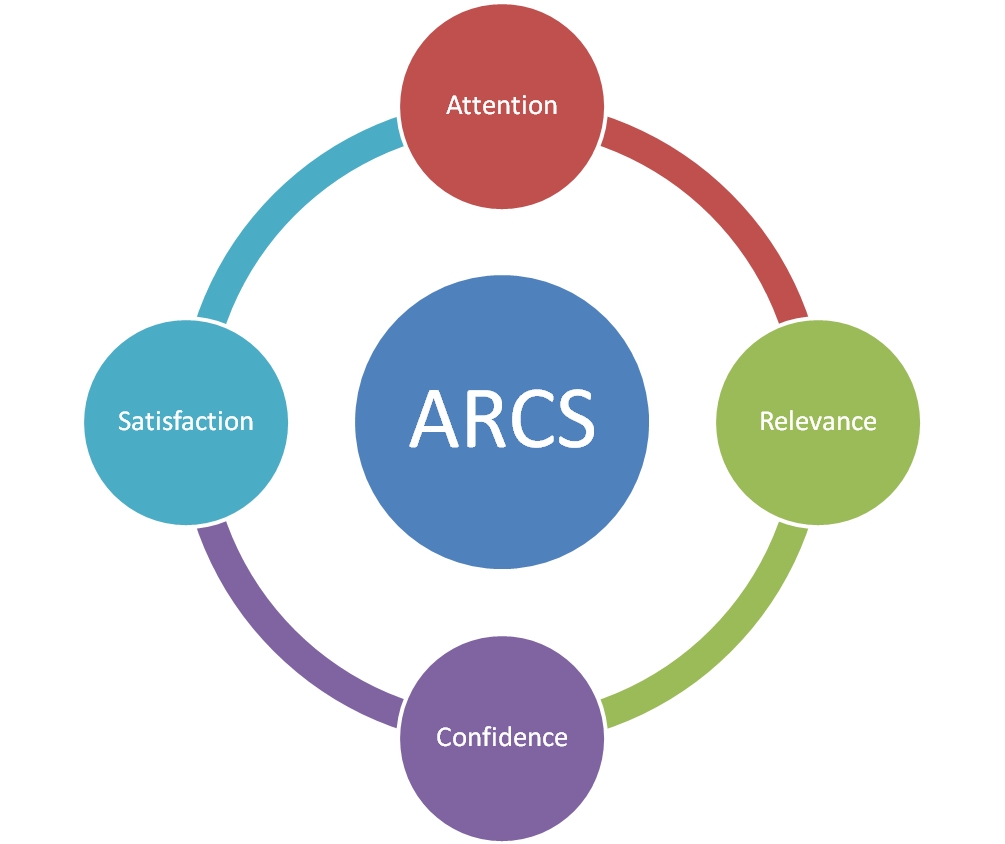
    Our group is investigating the ARCS instructional design model using VoiceThread because we are very interested in improving overall online lesson delivery, student motivation, and success in online learning environments.

    Often students lack self-motivation, do not feel confident in online learning environments,  lack of feedback, support, lack of community, or don’t a clear understanding of realistic course expectations.

    VoiceThread can provide a powerful communication tool to assist faculty in implementing the ARCS model of instructional design.  Our group will be building a ADV ID Model on the ARCS using voicethread and sharing via Google Sites.  

    Each member of the team will be working on a piece of the ARCS model, adding to resources, Works Cited, and the Evaluation piece.  

    Our timeline includes the following:

    3/18-3/23 – Planning and building ARCS VoiceThread Prototype

    3/28 – Design Document presented for group critique

    4/8-4/12 – Development of Activities, Assessment, Evaluation

    4/15 – Development complete including assessment and evaluation tools

    4/16- Implementation of beta group testing through link in Schoology

    4/28 – Collection of VoiceThread creation assessment and course prototype evaluation survey

    4/29-5/3 – Statistical Analysis of data

    5/6 – Group presentations of course prototype


    3/18-3/23 – Planning and building ARCS VoiceThread Prototype

    3/28 – Design Document presented for group critique

    4/8-4/12 – Development of Activities, Assessment, Evaluation

    4/15 – Development complete including assessment and evaluation tools

    4/16- Implementation of beta group testing through link in Schoology

    4/28 – Collection of VoiceThread creation assessment and course prototype evaluation survey

    4/29-5/3 – Statistical Analysis of data 5/6 – Group presentations of course prototype

    ARCS: A Conversation with John KellerImage


  • Considering How To Improve Virtual Learning

    Connecting is key to experiencing positive LMS experiences.  Instructional designers must consistently evaluate content.  Often faculty lack time to revisit learning approaches, but improving the quality of online learning platforms is crucial to growing post-secondary environments.  LMS must be systemic and continually evaluated.  Far too many virtual courses develop a learning repository for students and courses are not viewed as unique experiences.  This often leads to feelings of detachment from both the learner and instructor.  Content may become dated.  Instruction often lacks meaning.  Building stronger connections requires both collaboration and evaluation of instructional approaches.   Faculty often do not revise courses in LMS environments.  Approaches to holistic and consistent instructional design is needed for all learning environments, virtual and face to face.

    The Kemp Model

    Image

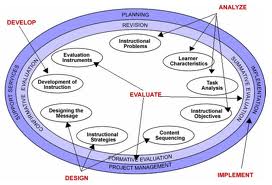
    The Kemp Model is one approach to revising content within the learning environment.   The designer is free to begin with any Kemp Model element and instructors can be flexible as they do not have to present elements in any particular order.  Multidisciplinary approaches must be considered by faculty.  How can we reliably and consistently evaluate online learning environments?  How do we keep the element of creativity as we apply standardized evaluation techniques?  Models are tested.  Theories explain the whys surrounding learning outcomes and experiences related to an instructional model.

    ARCS Motivational Design

    The ARCS model appeals to me as it lends itself to a strong sense of community and student motivation.  Using experiences, visuals,  relevance, and strong collaboration exercises provide meaning. Satisfaction and confidence are two great elements for faculty to consider measuring.  The ability for users to form deeper short term and long term relationships is measurable.

    Image

  • Improving Instructional Design

    How do you understand the differences between advanced and basic instructional design?

    Advanced instructional design pushes student intrinsically to create meaningful and real world connections, using building blocks, to acquire new knowledge.  Instructional design is more than just presenting information to students.  It is the ability to provide students with the need to learn more.  Advanced instructional design allows for learners to have clear goals, utilizing a variety of perspectives, to allow for students to generate questions and to understand different points of view.  Good instructional design extends the learning environment to include an efficient process .  Learning technologies can extend the learning environment and give students the ability to consume, evaluate and produce knowledge in a social environment.  21st communication opportunities take instructional design to an entirely new level.  Advanced instructional design utilizes alternative assessments and provides ongoing student led evaluation or reflections. Creative elements are used to differentiate learner experiences to produce a positive outcome.

    Challenge based learning is an area that I am very interested in exploring.  Advanced instructional design must be meaningful to the student, and I feel this is one way to give content meaning.  Students need a wider audience to develop critical thinking skills, to evaluate information after reviewing a variety of perspectives, and to propose or contribute their interpretations to a wider audience.

  • Instructional Design for STEAM Camp

    STEAM Academic Camp:  TAP (Topics, Audience, and Purpose)

    Topics

    Careers in Science, Art, and Technology:  Exploring Career Opportunities in STEAM


    Learn To Talk Like An Astronaut:  Building Scientific Academic Vocabulary


    Fun With Magnets:  Understanding Magnetic Force


    What Is The Big Deal With Space Weather?   


    You Be The Teacher:  Checking for Understanding


    Creating eBook Reflections:  Reflecting on Solar Storms, MMS Mission, Magnetic Force, Career Opportunities, and extended learning field trips


    Building a Zip Line


    Designing and programing a Robot


    Building a Community Showcase


    Purpose:


    Students will be placed in small groups and will learn about the process and purpose of the MMS mission so that students understand the background of magnetic force, space weather, auroras, solar storms, careers, and the MMS Mission.  Afterwards, students can complete the MMS Challenge and create a community showcase.  Students and teachers will learn how STEAM affects all content areas during this exercise.  Teachers will also be placed in small groups and will pick the area that they feel would benefit them the most in the classroom next fall and/or area of interest. 


    Audience 4-6 grades students:  STEAM (Science, Technology, Engineering, Art, and Math)


    NEEDS


    Instructor Needs:  Introduction to objectives and purpose of STEAM camp, science vocabulary on NASA’s MMS mission, options for integration tools for teachers to facilitate, concerns, training on integration apps and how to build an eBook, Questions and connections to content area needed., strategies to evaluate student work and progress.   


    Student Needs:  Engaging activities that are “camp” like that will expose students to new academic vocabulary that address diverse learning styles, hands on activities, planning, communication with parents,  inclusion of multicultural activities and perspectives, options on choices for students, feedback from students, student evaluation strategies. 


    Environmental Resources:  iPads, iPods, and MacBook Airs, Lego WeDo and Lego NXT systems, Smart Boards, Projectors, and Speakers, paper, markers, art supplies, tape, and Legos.


    Instructors are being trained daily on different skill sets, and these 18 teachers received training on Tuesday June 12 and Wednesday June 13 from 4:00-5:00 PM. 


    Learning Expectations:


    Course Goals and Objectives:


    Learning goal 1.0:  Students will explore scientific academic vocabulary and on solar storms, auroras, the sun, scientific method, and the Earth’s magnetosphere. 


    Objective 1.1:  Students will create an informative video on the meaning of their favorite scientific vocabulary term relating to solar storms, auroras, scientific method, the sun, or the Earth’s magnetosphere.


    Learning goal 2.0:  Students will conduct collaborative research and apply the scientific method to evaluate results. 


    Objective 2.1:  Students will research from a variety of preselected resources in collaborative groups questions important to the background of NASA’s MMS Mission on solar storms, the sun, the Earth’s magnetosphere, MMS Mission,  and the scientific method.


    Objective 2.2:  Students in collaborative groups will create an instructional presentation from research.  Research presentations will be published and shared to a mobile audience. 


    Learning goal 3.0:  Students will explore and experiment with magnetic fields following the scientific method. 


    Objective 3.1:  Students will create their own magnet following the scientific method approach.   


    Objective 3.2:  Students will create their own compass to further understand magnetic force following the scientific method approach. 


    Objective 3.3:  Students will create an ebook in collaborative groups to reflect learning experiences. 


    Learning goal 4.0:  Students will understand robotic design concepts, practice teamwork, apply problem solving, and understand simple machine language.


    Objective 4.1:  Students will plan, design, build, and work as teams to have a lego bicycle ride a zip line.


    Objective 4.2:  Students will be able to identify and understand how math and science applies to simple machines. 


    Objective 4.3:  Students will design, build, and work as teams to build a robot.


    Objective 4.4:  Students will be able to modify and problem solve to enhance their robotic production.


    Objective 4.5:  Students will be able to program their robot to utilize sensors. 


    Learning goal 5.0:  Students will explore career pathways and opportunities in the field of STEAM. 


    Objective 5.1 Students will develop questions to ask an expert in the field of STEAM: scientist, artist, journalist, technologist, engineer, or architect.  Questions will be shared electronically. 


    Learning Activities: 


    1. Students will think about questions to ask a career professional in the area of STEAM. 
    2. Students will record pre-interview questions for a professional in their career interest.
    3. Students will interview via video conference/in person a professional in the field of STEAM. 
    4. Students will pick their favorite scientific word from an academic word wall.
    5. Students will research the word to find the scientific meaning and create a vocab video on the meaning of the word using 3-5 images.
    6. Students will explore magnets and magnetic force.  Students will build an electro-magnet following the scientific method.  Students will record reflections.
    7. Students will explore and research topics related to the sun and solar weather.   Students will understand how to predict solar weather and review past solar weather activity to compare and contrast solar weather reporting and solar weather impact on human life. 
    8. Students will create an informative eBook from experiences in Careers, solar weather, academic vocabulary, and magnetic force learning experiences.
    9. Students will conduct a pre-evaluation on what they know and/or need to know about robotic systems.

    10. Students will become familiar with robotic kits, classroom management of robotics, and

    11. Students placed in teams will problem solve to build a zip line.

    12. Students will plan, design, and build a robotic system.

    13. Students will program their robotic system to utilize a sensor.

    14. Students in teams will plan, coordinate, and produce a  community showcase or museum exhibit based on complete learning experiences . 


    Assessment: 


    Scientific Community Showcase


    Evaluation: 


    Peer Review, Student Self Evaluations, Reflections


    Timeline/Calendar: All training with teachers is small group based. 


    June 4:  Teacher PD On purpose of STEAM camp, MMS mission purpose, and practiced 21st century skills:  Worked You Be The Teacher and was given a STEAM camp overview.


    June 11:  STEAM camp kick off with Digital artist, ice breaker activities, and participate in You Be the Teacher, Learn To Talk Like An Astronaut, and Fun With Magnets. 


    Teacher training after camp on what is the Big Deal with Space Weather, Careers in Science, Art, and Technology.


    Juen 12:  STEAM Camp:  Build paper rockets, What is the Big Deal with Space Weather, Careers in Science, Art, and Technology, You Be the Teacher, Learn to Talk Like an Astronaut , and Fun With Magnets.


    Teacher Training:  Using Gimp for Academic vocabulary, Using Animoto for Vocabulary and Video Production, Blogging tools and Introduction to iPad Apps


    June 13:  MMS Challenge with students at STEAM camp


    Teacher Training:  Building an eBook, Design a Zip Line


    June 14-17:  NASA trip, teachers and students will build an eBook


    June 19:  eBook Reflections with students, Design a Zip Line


    Teacher Training:  Strategies to help student design and  Build a Community Showcase


    June 22:  Build a Community Showcase Event


    Student Evaluations Daily


    Teacher Training and Learning Evaluations:  June 11 and June 22