Tag: Integration

  • Sun + Technology + Earth + Art + MMS = NASA Sun Earth Day Celebration

    Students that participated in Dublin/RYSS’s Joint Art Workshop in the spring of 2012 utilized solar weather data images provided by NASA to produce digital art that was used for the backdrop during NASA Edge’s press conference held to celebrate Sun Earth Day 2013.  Tom Chamber’s students attending RYSS and DISD students researched academic vocabulary related to space weather and the sun to develop a working knowledge and purpose surrounding the mission.  Students from RYSS traveled to DISD to teach students how to utilize GIMP and utilize NASA data images to create a personal reflection surrounding the mission.

    Dublin Independent School District is located in central rural Texas and is beginning its second year studying about NASA’s MMS (Magnetospheric Multiscale (MMS) mission).  Students are learning about solar weather, earth’s magnetosphere, and magnetic force.  Students participating in DISD’s STEAM (Science, Technology, Engineering, the Arts, and Mathematics, 2012 camp experienced joint PD with teachers learning 21st Century skills and STEAM career opportunities.

    STEAM camp produced much excitement in Dublin during the fall of 2012, and students formed a robotics club to focus on the engineering components.  Students attended their first robotics competition, hosted a MARS party to teach skills to a neighboring district, and participated in PIE (partners in education) showcase during the spring of 2013.

    DISD will host another STEAM camp during June of 2013 to learn more about how the sun can be utilized as a renewable energy source.  Students in Texas were very excited to see their work showcased yesterday.

    NASA’s MMS Educational Resources 

    Creativity Tools

    ISTE NASA MMS Challenge

    STEAM Resources

    NASA EDGE Sun Earth Day 

    Dublin ISD/RYSS NASA Edge Webcast

  • Exploring MUVEs in K12 Environments

    Working with an atmosphere of high stakes testing, time needed to direct students towards instructional engaging students using MUVE (Multi-User Virtual Environments) is limited.  How can leaders promote the use of MUVE in an after school program?  Would such a program be engaging?  Would students gain valuable knowledge participating in after school instructional MUVEs?

    MUVE’s can foster collaboration and learning communities.  Jones & Warren’s (2011) study demonstrates tough challenges facing K12 teachers interested in pursing MUVE integration approaches, with only one of nine research participants able to move forward to utilize a MUVE with students.  Little research can be found to support integration of MUVEs in the K12 classroom, and there is a strong need to show that such environments improve academic yearly progress (p. 6).

    Sardone & Devlin‐Scherer (2008) point out that developers often fail to consider learning processes and first consider the user not the learning process.  Further research on learning outcomes is needed in this area.  Students do spend a lot of time after school accessing participating in a MUVEs.  Could developers and ed tech corporations leverage games and MUVEs to produce a more knowledgable society by considering first the learning process during design?   How can we leverage after school K12 time using MUVE’s to enrich learning experiences?  The market exists.   Perhaps a generation of STEAM learning designers, scientists, programmers and digital artists are needed.  It would be very interesting to have students recreate history like the example here, Teachers Discovering History As Historians.

    Are you interested in virtual gaming in an after school tutorial program?  Here are some K12 resources.

    Multi User Environment Educational Resources

    MindCraft Educational Resources

    Jones, G. & Warren, S. J. (2011), ‘Issues and Concerns of K-12 Educators on 3-D Multi-User Virtual Environments in Formal Classroom Settings.’, IJGCMS 3 (1) , 1-12 .

    Sardone, N. B., & Devlin‐Scherer, R. (2008). Teacher candidates’ views of a multi‐user virtual environment (MUVE). Technology, Pedagogy and Education, 17(1), 41–51. doi:10.1080/14759390701847484

  • Creating Young Authors

    How do you get kids interested in writing?  You might consider having your students create an ebook or ibook and sharing best examples with the school, parents, or community to encourage reading.  Today anyone with a computer or device that connects with the Internet can create an ebook, which is great news for students.  Students can build their own reference works and become young authors to publish and share stories with the world. 


    1. It is very simple to create an ePub book in Pages on your Mac.   ePub documents can be shared with your iPod, iPad, or iPhone.  http://support.apple.com/kb/HT4168  Teachers doing this many times will share files on their blog or school web page with parents to encourage reading.
    2. iBooks Author is a free app that allow students or you to create Multi-Touch books for your iPad.   I know many of you that worked STEAM camp last year have a teacher iPad and students have access to iPads at the intermediate.  I encourage you to play with this app because it is really fun and students can really get creative.  http://www.apple.com/ibooks-author/  
    3. Storybird is a great way to have a collaborative, groups of 2, work together to create a story.  Students choose from a collection of art to be inspired to write stories.    After students select art, students are able to build their story by dragging and dropping pictures and creating a story to match the artwork chosen.  Some teachers even partner with another teacher’s classroom from another country. 
    4. 4.       Presentation software can be used to create ebooks.  You can create an ebook in Keynote on a Mac or PowerPoint on a PC.
    5. Simple Booklet lets student authors combine text, images, videos, and audio files.  There is a commercial and education version.  The education option offers the benefits of commercial features without cost to teachers.  Students can share their eBook by embedding it into a webpage or providing the unique link generated for your booklet.  http://simplebooklet.com/index-sb.php#
    6.  Scribble Press:  http://www.scribblepress.com/
    7. Scribblitt:  http://www.scribblitt.com/
  • Giving students a voice….

    One way to engage students is by giving students a voice. Technology can really help facilitate learning because it provides multiple communication channels that the teacher can use to give students a voice (who may not otherwise engage), which empowers them to take ownership in their learning. A larger audience can allow for the student to extend learning outside of the classroom. Technology is not the answer to academic issues. We must use it in a meaningful way that motivates students to think. Our task is to create a new generation of problem solvers and critical thinkers. Technology must facilitate higher order thinking activities. You can find a lot of “junk” technology activities that are not engaging or fun, especially linear activities.

    Some other thoughts: We have to be careful not to crush student ideas, voices, etc. We don’t always “know” better. Stand and deliver style of teaching does fit is some cases, but we need to spend less time presenting and more time allowing kids to If you truly value student voice, they must know that their ideas can direct the path to learning. Think about how you can give your students a global voice. How do we build a career focus, or career voice, to produce college ready graduates? Students must know that you believe in them. We must show that we like what we are teaching and what we teach. Choose learning technologies that give students a voice and allow them to contribute not just work linearly to contribute only to themselves, you, or a grade. Are we spending all of our time on compliance and standardization? Don’t be boring, push beyond the easy and comfortable. Students are often willing to choose boring over taking a risk. Expect students to do exciting things. Recognize boring and redirect, remove the safe option. Foster joy, we should all be laughing more because kids learn in a happy environment. An expert recently told me that we should incorporate the 5 model, Engage, Explore, Explain, Elaborate, Evaluation. Their suggestion was to move the first 3 online, and that will save you time for elaboration and evaluation. The flip concept is only a system, the strategy of 5 e is still needed from you. You and your relationship with students is still the most important motivating factor. If you want to use a flip system, you must question, elaborate, and evaluate in class. Videos alone will not address learning issues. You must expect students to do their part and follow through. It does work and is working in many areas in the nation and state. However, teaching is still the most important component.

    Some ideas:

    1. Creating a how to video and blog (written) evaluation reflections: Great alternative formal assessment tool. I am very proud of Debra Miller’s leadership in creating a video to publish on the junior high web page. A parent called this morning very excited to see the video. Keep up the excellent work.

    2. Twitter: Students from one district last night led a state wide twitter chat on giving students a voice. Twitter widgets on your website really interest students. Teaching students how to act professionally online can be modeled in this way. Check out #txed hash tag to view how students led a very professional collaborative discussion on this topic. We have Dublin High School students using twitter and I enjoy seeing students contributing to increase school spirit. How can we get kids to begin contributing about core subject on instructional content?

    3. Skype: Skype in the classroom is a great way to find partners to allow for students to collaborate, present, use higher level questioning, and elaboration on evaluation of ideas. This is an excellent way to bring “experts” into your classroom.

    4. Offsite curriculum center: We have access to produce content to showcase to the community. How can you take advantage of this? Need ideas, let me know. I was very impressed with Donna Lewis’s 2nd grade and 3rd grade students. The entire class was highly engaged with her yesterday, check out one production example: http://animoto.com/play/Fxc4wpIsQwEYUTyr6l6zxw
    5. Empower students to be creative and help them to understand that they matter.
    6. Consider your physical learning space. How can you redesign learning spaces so that they are “fun”?   I got to visit with students earlier this week at the high school and they expressed how that action created a more relaxing and fun atmosphere.

    7. Problem solving and failure with a voice: Robotics is a way to get kids motivated and you would be surprised at how these kits can fit your exiting curriculum. Lego released a writing curriculum this week that encourages creative writing and academic vocabulary development. The production that is created by the team gives students a voice by allowing them to showcase a robot to a wider audience. It is great to see so many students enjoying problem solving activities using robotics.  Dublin High School, and photos from Dublin Intermediate and Junior High students who are so excited to be part of the after school robotics club. We have 47 students participating weekly in an optional after school program. These students are having fun expanding in writing journals, collaborating, thinking and problem solving. . We learn from failure. Research on this topic: http://hbr.org/2011/04/strategies-for-learning-from-failure/ar/1

    8. Portfolios are a great way to showcase student work and online portfolios gives students a large voice that they can then take to a wider audience. This is a great way to give students a career voice. With project share, students have an Epsilen portfolio account that can allow all teachers to “showcase” a student production that they can then add to their existing portfolio.

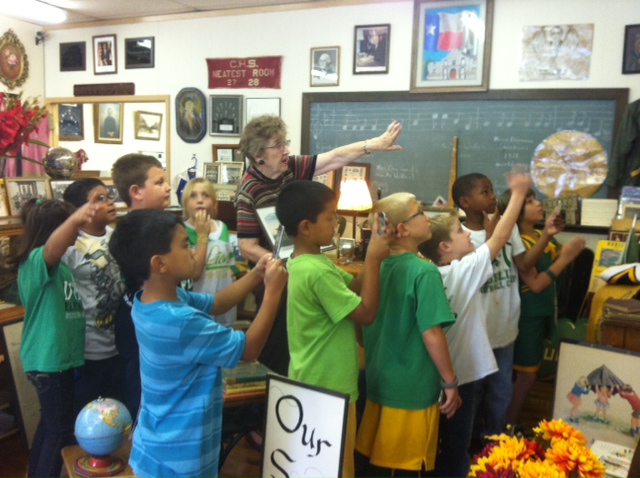
    It was fun taking students with their teacher, Mrs. Donna Lewis, to the Dublin Historical Museum recently.  Students really enjoyed learning about museum artifacts, conducting research, using their iPods to record photographs, and creating a movie to publish for a wider audience.  Learning really can be fun!

    Image

  • Academic Vocabulary Tech Strategies Taking STEAM

    I wanted to share some resources that I came across from my literature review this weekend that addresses a topic that all teachers are working with this school year. I found the information very useful and thought I would pass it along.

    Some key resources and ideas:

    1. Learn from Visual Display of Word Relationships with Text. Many of you are already using http://www.wordle.net/ or http://www.tagxedo.com/.

    Questions that you can use in with the tools could be the following:  How do these words go together? Why do you think the Wordle designer chose this shape of word cloud? What superordinate terms reflect the main ideas? Creating with art can inspire kids to learn more and give the lesson a meaningful purpose. Besides printing the Wordle for peers and the school to enjoy, you can also embed in a class blog, share via social media, or insert in a PowerPoint.

    Another free word cloud tool is WordSift, http://www.wordsift.com/

    2. Take a Digital Vocab Field Trip: TrackStar allows you to collect a series of websites and annotate them so you that students can follow the online journey. Literary field trips are also popping up in Google earth.

    3. Games: There are many vocabulary games that you can utilize with your smart board. http://www.vocabulary.co.il/ , http://www.sheppardsoftware.comhttp://www.vocabulary.com/

    4. Have students use media to express vocabulary knowledge. Many teachers practiced this during STEAM camp. Animoto, Prezi, SlideShare, Keynote, PowerPoint are all easy ways to foster creativity and build academic vocabulary. One easy way to create academic flash cards or photos is to save an individual slide in PowerPoint as a picture.

    5. Take advantage of online word reference tools that are also teaching tools. I use this every day and find that it is a wonderful way to increase your own vocabulary.  Check out SAT Vocabulary Word Videos.

    Try www.visualthesaurus.com, which  includes a Behind the Dictionary and Teachers at Work feature.

    Dictionary.com is a another resource that we have downloaded as an app on many devices.

    6. Develop Strategic Digital Readers with On-Demand” Vocabulary Help. One way to facilitate this is to support reading and world learning with just in time vocabulary reference support. I have a very long list of these tools if you are interested.

    7. Use Language Translators to Provide Just in Time help for ELs. Yahoo! Kids dictionary supports 90 languages and includes a translator, and students need to know how to utilize this option. The value of a translator is that it supports learning words as they occur naturally in authentic texts and allow students to view bilingual versions of a text side by side so they can use their first language knowledge to develop their English vocabulary. Babelfish, Google translator, Bing Translator are not always perfect but they are a great start.

    8. Increase Reading Volume by Reading Digital Text: Reading current events is a great way to tap into digital reading. Time for Kids, Weekly Reader, National Geographic Kids, National Geographic Kids’ blogs, Science News for Kids are some current event resources.

    9. Text To speech tools and audio books: Anything viewed in Safari can be read to an audience aloud.

    10. Combine Vocabulary Learning to Social Service

    Students desire to to create, participate in global communities, and utilize web 2.o and social media environments. Free Rice, is a great way to give students the opportunity to give back to the planet and extend their learning experience to a greater cause.

    GratefulGram  is a tool that I think can help facilitate the same ideology.

    Take Action: Analyze your current vocabulary instruction and the needs of you students. What current low tech task might be replaced or embraced with an eVoc strategy that uses multimedia? Are there gaps in your students’ vocabulary learning skills that can be supported with a digital tool? Be sure to include time for sharing students’ new knowledge about words, strategies for using digital tools and media, and their creative products. Remember, we have computers in an offsite curriculum center where we can showcase student work. View your integration of technology and vocabulary as an opportunity for exploration and inquiry. How might you share what you are learning with other teachers? Do not forget how much fun words can be, especially when evoked in a digital content.


    Dalton, B., & Grisham, D. L. (2011). eVoc Strategies: 10 Ways to Use Technology to Build Vocabulary. The Reading Teacher, 64(5), 306-317. doi:10.1598/RT.64.5.1